
Can ChatGPT Read PDF? How to Get It to Read Any PDF?
- Can ChatGPT Read PDFs?
- How to Use ChatGPT to Read PDF?
- Easy Tips for Making ChatGPT Read PDF
- Why Can't ChatGPT Read My PDF?
Can ChatGPT Read PDFs?
Yes. ChatGPT can read PDF files. This feature is available in both free and paid tiers of the AI chatbot. You just need to import a PDF and ask ChatGPT to analyze, extract, and summarize PDFs. In this way, you can understand documents without going through it manually.
How to Use ChatGPT to Read PDF?
Getting ChatGPT to read a PDF is quite simple on both the app and website. Using the ChatGPT website as an example, here is how to get ChatGPT to read and process a PDF document.
Step 1. Visit chatgpt.com
Step 2. Click on the Plus button next to the chat box and select the PDF file from your computer or mobile device. ChatGPT also supports uploading files from connected third-party platforms.
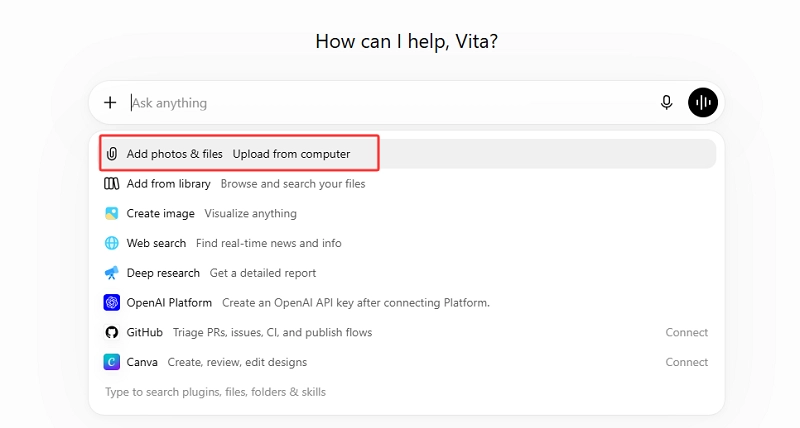
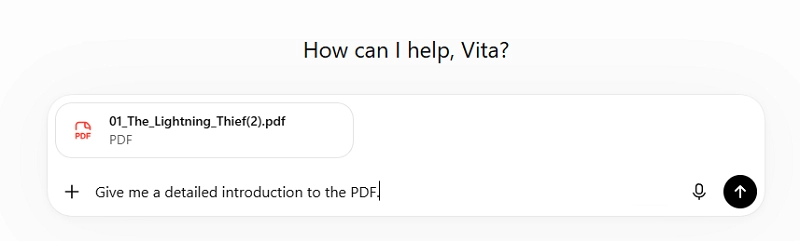
Step 3. Once the upload is complete, tell ChatGPT what you want it to do with the PDF, such as make chapter-by-chapter summaries, extract the key metrics from the PDF, and generate a professional report.
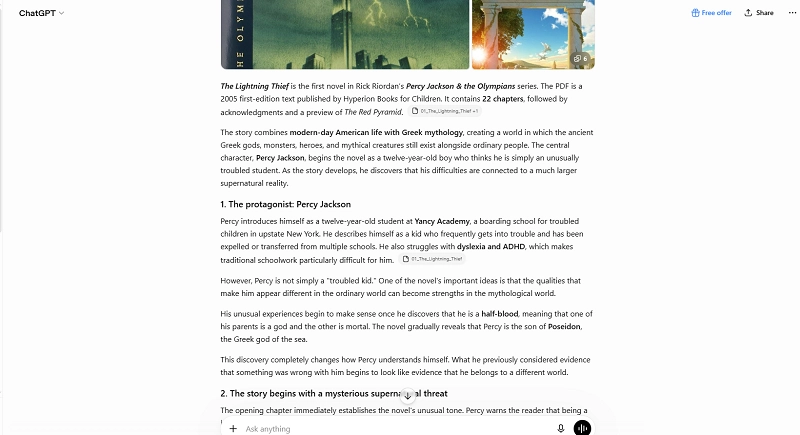
Step 4. You can continue the conversation in the current chatbox and ask for more information you want to know about the document.
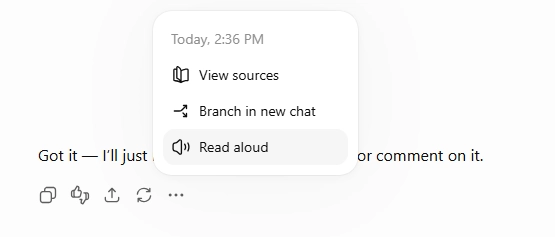
ChatPDF offers a Read aloud feature that lets you hear the answer given by the AI, rather than read it to the letter.
Easy Tips for Making ChatGPT Read PDF
1. Give a specific and clear prompt: State your goal directly and define constraints such as scope, length, and format. Avoid vague or abstract instructions.
2. Break large documents into smaller sections: Instead of asking ChatGPT to process one large PDF all at once, divide it into smaller sections and process them separately.
3. Convert the PDF to a more flexible format: If the PDF contains multiple layouts, unusual fonts, or unique formatting elements, converting it to Word or plain text help ChatGPT comprehend the content more effectively.
Also Read: How to Convert PDF to Markdown >>
Why Can't ChatGPT Read My PDF?
ChatGPT offers full support for PDF reading & processing in the latest GPT-5.6 version, but you may still run into that ChatGPT can’t read PDF occasionally. Here are whys and how to deal with the problem.
1. You have reached your daily usage limit
ChatGPT imposes limits on file uploads and usage. Free users can upload up to 3 files per day, with a maximum size of 512 MB per file, around 400 pages of a PDF. If you’ve reached the daily limit, you’ll need to wait until the limit resets before uploading more files.
2. Your account doesn’t support PDF processing
What you can do with ChatGPT varies depending on your plan. Free accounts have more limited support for advanced tasks and rare content type. When you’re experiencing that ChatGPT can’t read PDF, a Plus or higher-tier plan may provide better support.
3. ChatGPT limitations in handling documents
ChatGPT is generally good at handling plain text, but it can struggle with scanned content, multi-column layouts, tables, and charts. As a result, it may fail to search for certain content or miss important details when processing a long PDF.
In such cases, an alternative like iBoomto AI can be a useful solution. This desktop AI agent works as a comprehensive AI document assistant that can read and understand your PDFs without altering the original file. You can ask questions and get answers even when the document is complex and scanned.
Was this helpful?
Thank you for your feedback!