
Why was I charged?
- Common reasons for unrecognized charges
- How to check your charge
- Tips to avoid unauthorized charges
- What to do after finding an unauthorized charge
Not sure why you were charged? An unexpected charge can be confusing, especially if you don’t remember making a purchase. There are a few possible reasons, and checking your billing details can help you figure out where it came from. Let’s take a look.
Common reasons for unrecognized charges
Here are some common reasons for charges that might not look familiar:
Subscription auto-renewal: We offer monthly and yearly subscriptions. Both renew automatically at the end of each billing period, so you'll see a new charge on your renewal date.
One-time credits add-on: If you ran out of credits, you may have bought an add-on credits pack. This is a one-time purchase and doesn't renew.
You have more than one iBoomto account: If you've signed up with different emails or login methods, each account has its own subscription and is billed separately. A charge may come from an account you don't use often.
A duplicate charge: A temporary network issue may have caused your first payment to remain in processing. If you initiated and completed a second payment shortly afterward, both transactions may appear on your bank statement.
Unauthorized purchases by others: You may have shared your device and your card or account details with family members or friends; they may have used your device, card, or account details to make a purchase without your knowledge.
How to check your charge
Step 1
Step 2
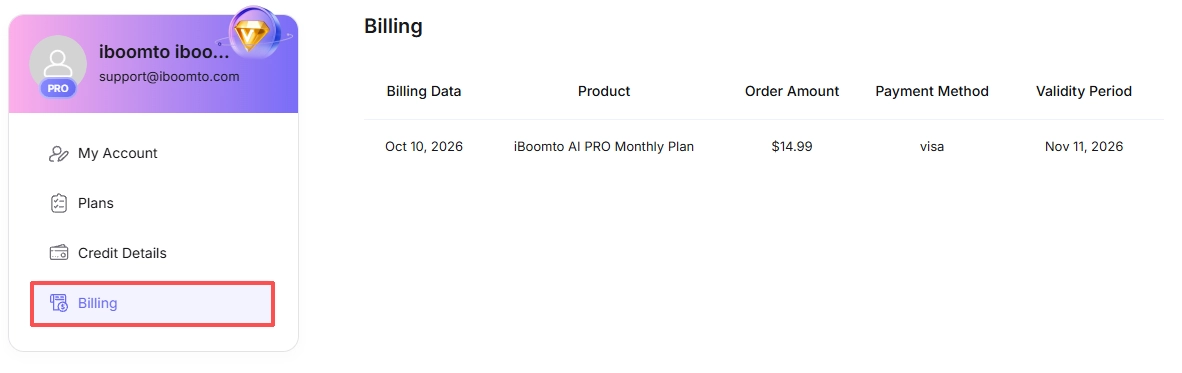
Step 3
Step 4
Tips to avoid unauthorized charges
1. Open Billing in your account from time to time to review your active subscription and past purchases.
2. Cancel before your renewal date if you don’t want to continue.
3. Signing in with the same email each time helps you avoid paying for separate subscriptions on different accounts.
4. Don’t submit a payment more than once. If the page seems stuck, check your Billing page or receipt email before retrying.
5. Keep your devices locked and your login and card details private, especially if children use the same device.
What to do after finding an unauthorized charge
If you followed all steps above and still don't recognize the charge and think it is without your permission, we suggest you can contact our Customer Support Team for further help.
Please include the following details in your message:
- The email address used for the purchase
- Your receipt (a screenshot or forwarded email is fine)
- The charge amount and date
Once we receive your message, our team will review the charge and get back to you as soon as possible.
Was this helpful?
Thank you for your feedback!