
Run Local AI Models withiBoomto AI

Enjoy trusted local AI models for document processing, all in one place. Start right away, with no configuration.

YourGo-To Hubfor Popular Offline AI Models

iBoomto is dedicated to making local LLMs more effective and easier to use for your document workflows.

Top Providers, One App

Run AI models from top-ranked providers without switching to different tools.

Auto-Match to Devices

Smartly analyze your hardware and suggest the most suitable AI models.

Fulfill Tasks as Needed

Dedicated AI models are available for every step in your pipeline.

Install and Run

Download iBoomto AI to access and run kinds of local LLMs with zero setup.

Library

Explore Local AI Models on iBoomto AI

Dive into the details of each model, compare their strengths, and choose the right one for your workflow.

Loading models...

Qwen3.8-27B

Qwen3
RecommendedMultimodalDownload Size: 8GB

Qwen3.8-27B

Qwen3
RecommendedMultimodalDownload Size:: 8GB

Qwen3.5 9B

Qwen3
RecommendedMultimodalWorks best with: 16GB RAM. 4 GB GPU memory. 7GB free storage

Qwen3.5 9B

Qwen3
RecommendedMultimodalDownload Size:: 5GB

DeepSeek R1 8B

DeepSeek
RecommendedText OnlyDownload Size: 4.8GB

DeepSeek R1 8B

DeepSeek
RecommendedText OnlyDownload Size:: 4.8GB

Llama 3.2 Vision 11B

Llama
RecommendedMultimodalDownload Size: 7GB

Llama 3.2 Vision 11B

Llama
RecommendedMultimodalDownload Size:: 7GB

Mixtral 8x7B

Mistral
Text OnlyDownload Size: 26GB

Mixtral 8x7B

Mistral
Text OnlyDownload Size:: 26GB
Selection Guide

How to Choose the Best Local AI Models for Your Work

The best fit depends on your input, desired output, and hardware. Follow the instructions below to compare local LLMs and pick the one that suits your needs.

Choose Your AI Model by Input Type

Text

Text-only models are good enough to process text-based documents in basic cases, whether they are emails, textbooks, or technical manuals.

FOR EXAMPLE
Granite4 Micro 3B Text OnlyLlama3.2 3B Text onlyAnd More

Scan

Instruct models can interpret document scans directly, with no extra OCR needed. For more complex visual processing, multimodal models are a nice option.

FOR EXAMPLE
Qwen3.8-27B MultimodalQwen3 Vision 8B InstructAnd More

Data

Ideal for CSVs, tables, and charts with minimal surrounding text, a Multimodal Thinking model handles reasoning, calculations, and step-by-step data analysis with ease.

FOR EXAMPLE
Qwen3.8-27B MultimodalQwen3 Vision 2B ThinkingAnd More

Choose Your AI Model by Task

Instruct Model

For everyday questions, content extraction, and summarization, an Instruct model is fast and typically all you need. It interprets your prompt right away and returns a direct, relevant response.

FOR EXAMPLE
Qwen3.8-27BQwen3.6-27BGemma4 31BGemma4 E4BAnd More
For Task
General Q&A
Summarization
Data Extraction

Thinking Model

When handling complex tasks like data analysis, source comparison, pattern recognition, and report writing, a Thinking model applies deeper reasoning to deliver verified and cited results.

FOR EXAMPLE
Qwen3.6-27BQwen3.5 9BGemma4 31BAnd More
For Task
Analysis
Comparison
Report Generation

Choose an AI Model Based on Your Priorities

Context Window

A local AI model's context window limits how much input and output it can handle in a request. Check a model's configured limit; parameter count alone does not tell you how much content will fit.

Output Quality

Run a few models on your own documents and keep the one whose results you can verify and whose requirements fit your PC. A newer release or a larger parameter count doesn’t prove a model is better for your task.

Speed

If you value speed above all, smaller models are often a good choice. Yet in practice, the speed of the same model can differ significantly across hardware setups.

Size

Download size describes how much storage a model file uses. Runtime memory depends on the model, its configuration, and the amount of content being processed. Check both before installation, and leave room for the app and other programs.

Run Locally

How to Run a Local LLM on Windows with iBoomto AI

Skip the guesswork! Get the best-fit local LLMs for your computer in one click.
Run Local AI Models on Your Device
1

Install iBoomto AI

Download iBoomto AI and install it on your PC.

2

Choose a Suitable Model

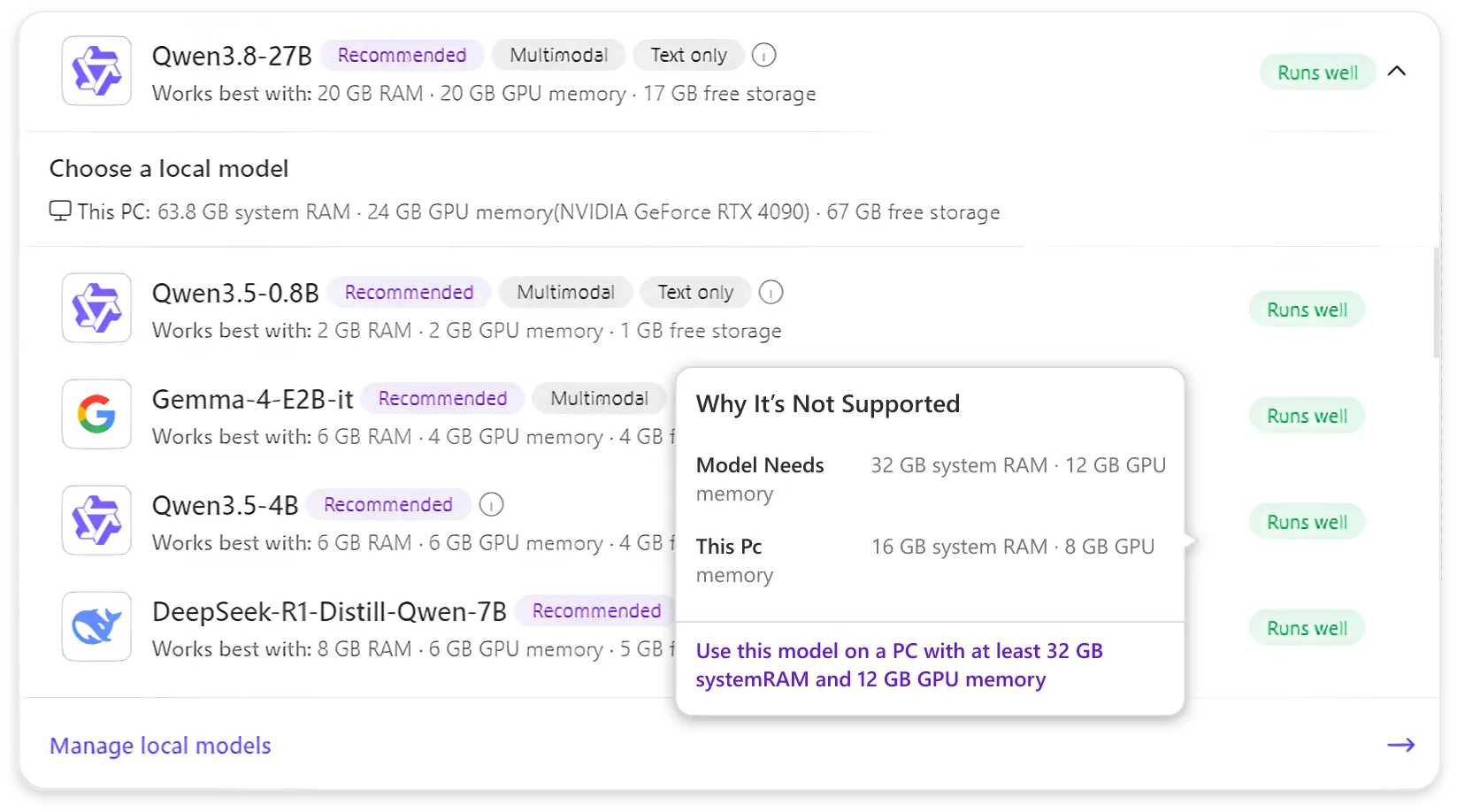
During setup, iBoomto AI automatically installs a model suited to your PC’s hardware specifications. To try another model, open the Local Chat drop-down list and click the info icon beside its name to check compatibility. Recommended models are labeled Runs Well. Choose one and click Download.

3

Run the Model

When the model is chosen correctly, upload your documents for processing.

Work with Documents
Work with Documents

How to Use Local LLMs for AI Document Processing on Windows

Powerful yet simple. Step into an effortless workflow with iBoomto AI.
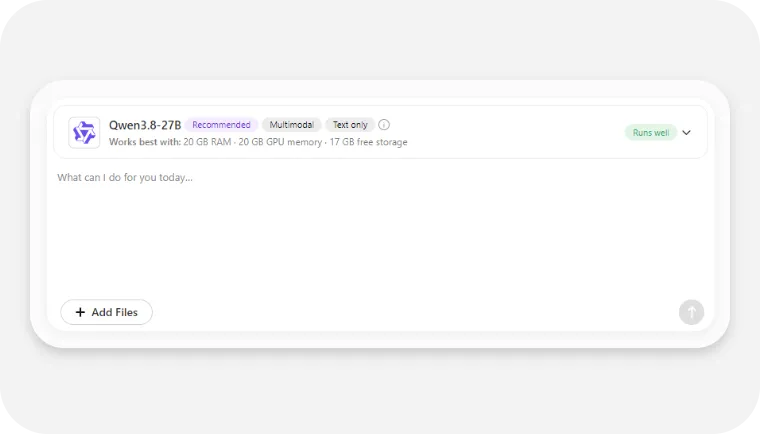
Upload Your File to Local Chat
1

Upload Your File to Local Chat

Launch iBoomto AI, go to the Local Chat section, and import the file you want to process.
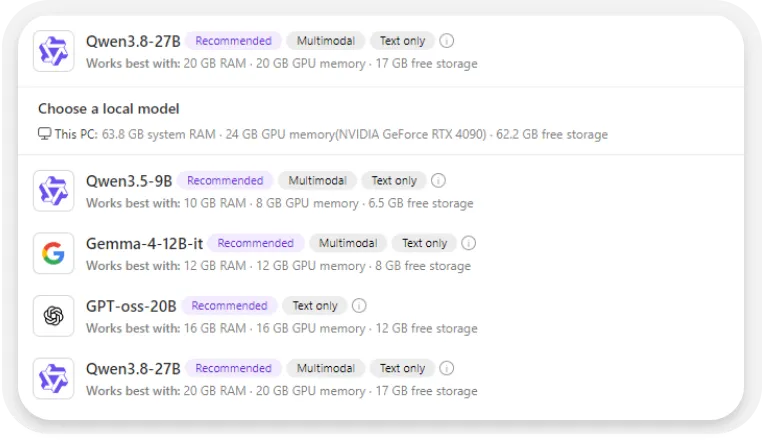
Set Model Preference
2

Set Model Preference

Select a well-running LLM, or download a compatible one if you don’t have it yet.
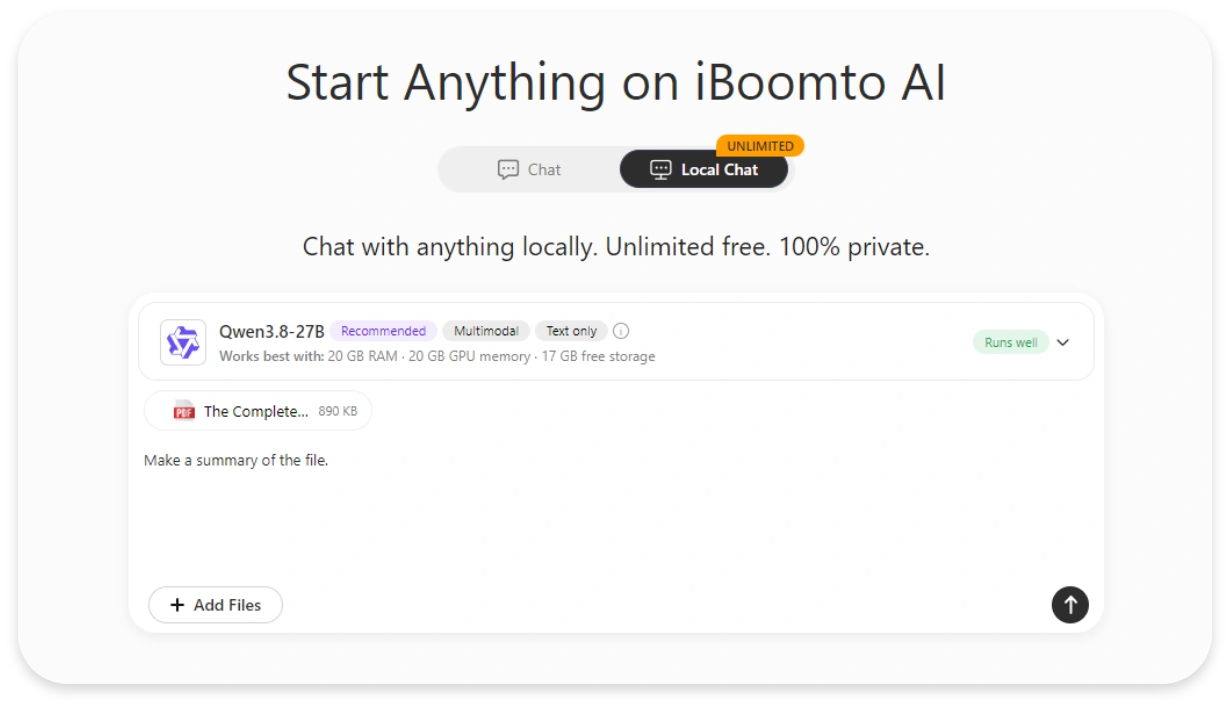
Describe the Task and Review the Result
3

Describe the Task and Review the Result

Ask the model to extract key points, summarize the document, check for possible errors, or draft a report. Save the results in .md and review against the source before using it.

No API, No Limits

Document Workflow Examples with Local AI Models

Ask. Summarize. Process in bulk. See how iBoomto AI’s local models get real work done across files and formats.

Summarize Academic Reports

Well-StructuredCitation-BackedQwen3.8-27B (18 GB)

1. Add the Document

User file: The Complete Financial Analyst Course - Financial items

2. Generate a Summary

Prompt: Summarize this document.

3. Review the Summary

Quickly generate the file summary ready for your review.

4. Ask for a Follow-up Question

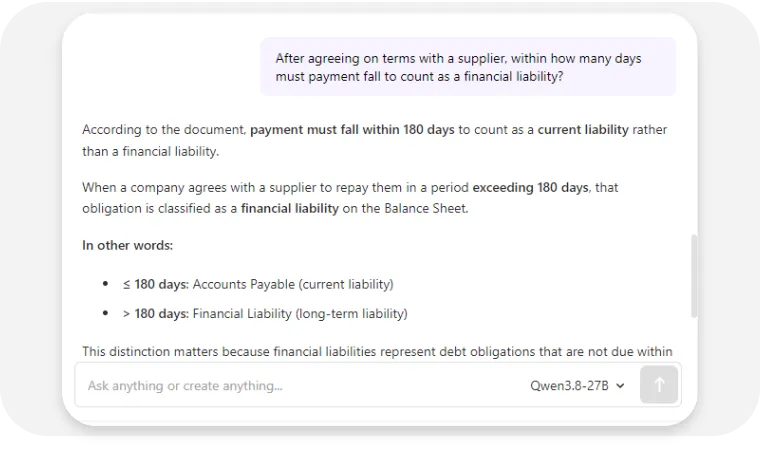
After agreeing on terms with a supplier, within how many days must payment fall to count as a financial liability?

5. Check the Answer

According to the document, payment must fall within 180 days to count as a current liability rather than a financial liability. When a company agrees with a supplier to repay them in a period exceeding 180 days, that obligation is classified as a financial liability on the Balance Sheet.
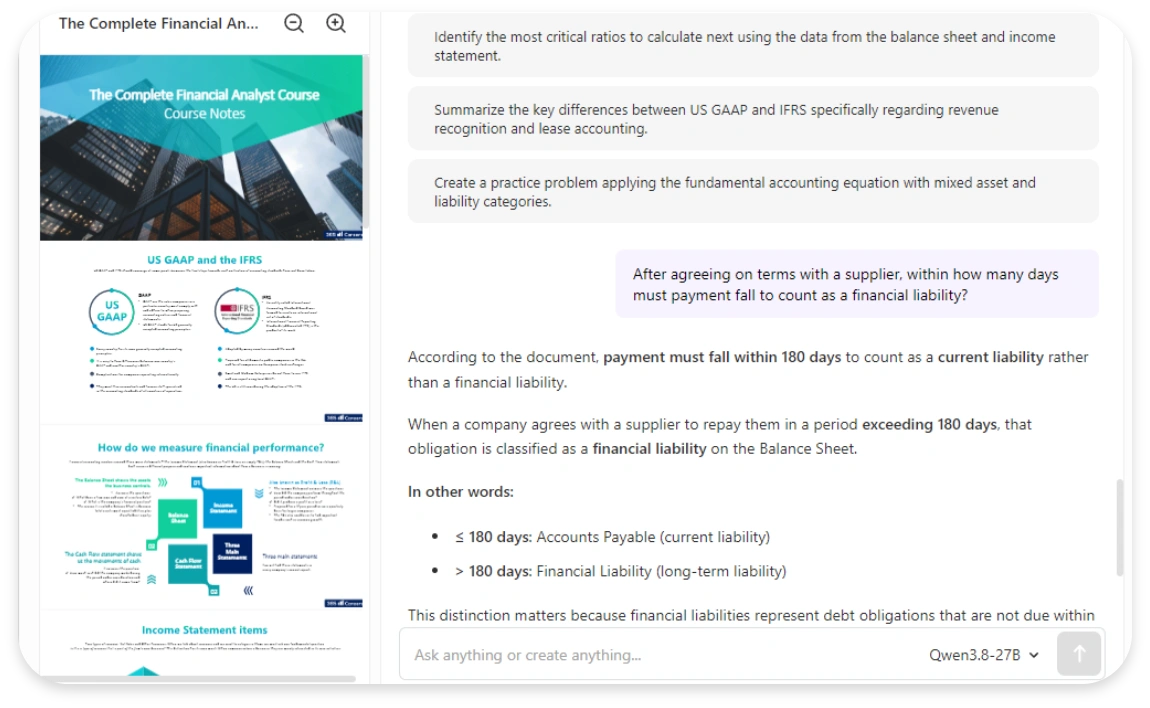
Summarize PDF with Local AI
Ask and Get Questions

Compare Multiple Invoice Files

Verified ClarityInstant ResponseQwen3.5 4B 3.4GB

1. Add Multiple Files

User files: Invoice 1, Invoice 2

2. Specify Desired Aspects to Compare

Prompt: All differences in the data between the two invoices?

3. Review Reported Differences Against Both Invoices

Result: Key Observation:
Invoice 1 shows consistent math: $85.00 + $8.50 = $93.50
Invoice 2 shows inconsistent math: $85.00 + $8.50 = $93.50, but the final Total field displays $63.50 (a $30.00 discrepancy)
Invoice 2 appears to have OCR/formatting issues (characters appear separated in the text layer)
The only substantive data difference is the Total field value in Invoice 2, which shows $63.50 instead of the calculated $93.50.
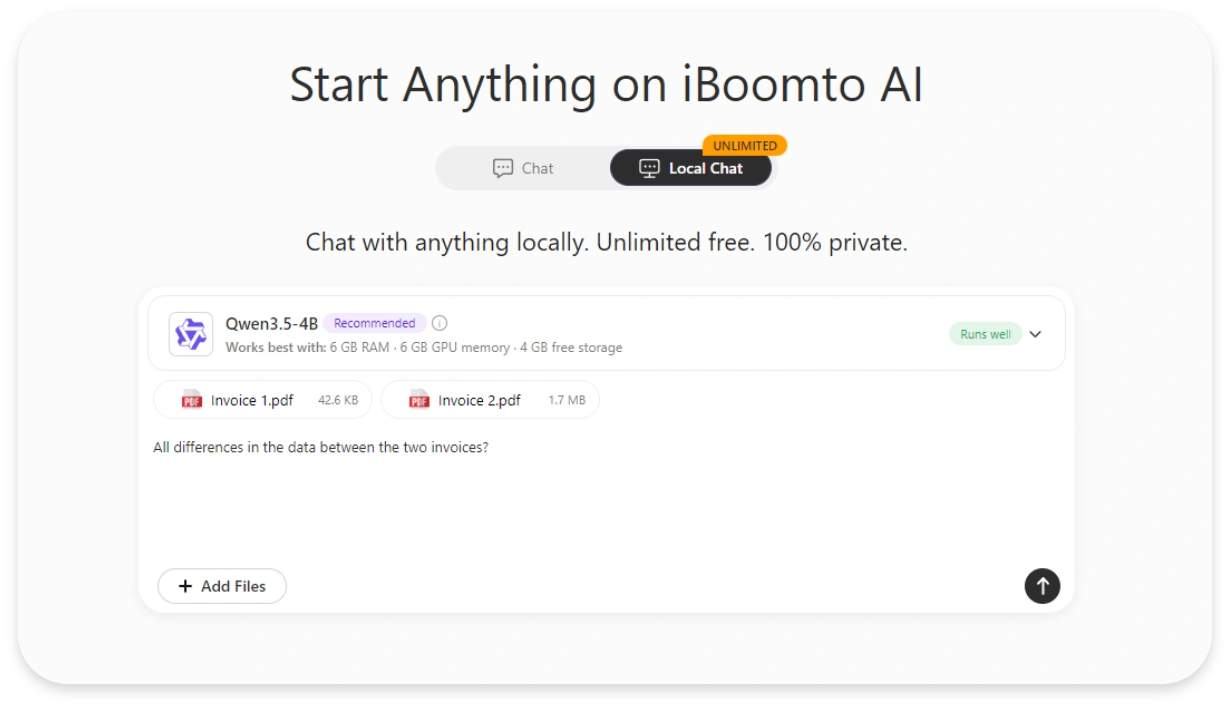
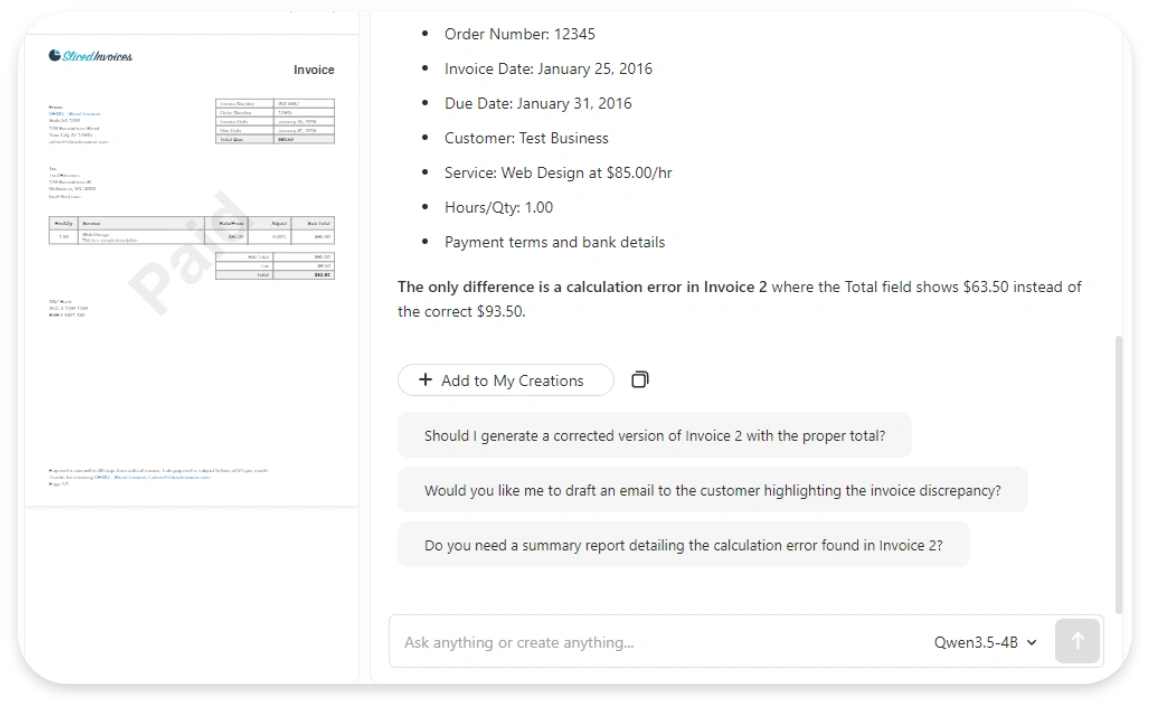
Compare Files with Local AI
Check out the Differences

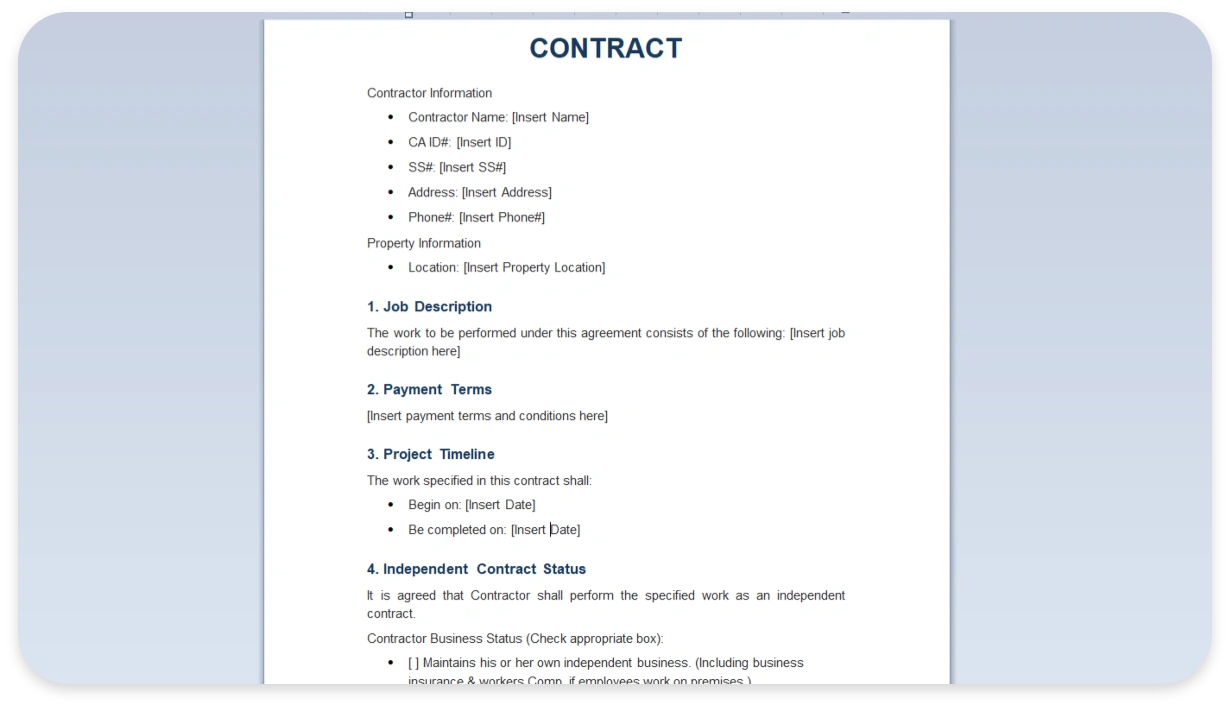
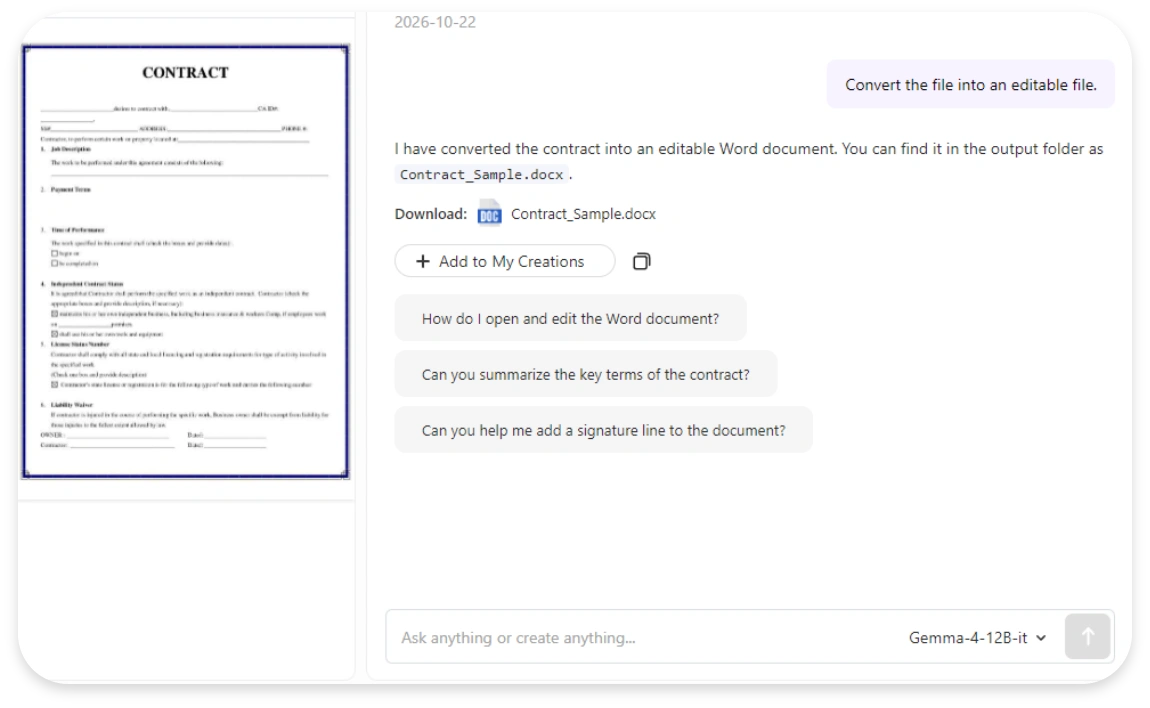
Extract Text from a Contract

Multimodal ReadingAccurate RecognitionGemma4 12B 12GB

1. Add the Contract File

User file: Contract Sample

2. Enter the Text Extraction Prompt

Prompt: Convert the file into an editable file.

3. Get the Result and Check the Extracted Text

Result: I have converted the contract sample into an editable Word document. You can find it at the location below: Output File: Contract_Template.docx Download: Contract_Template.docx
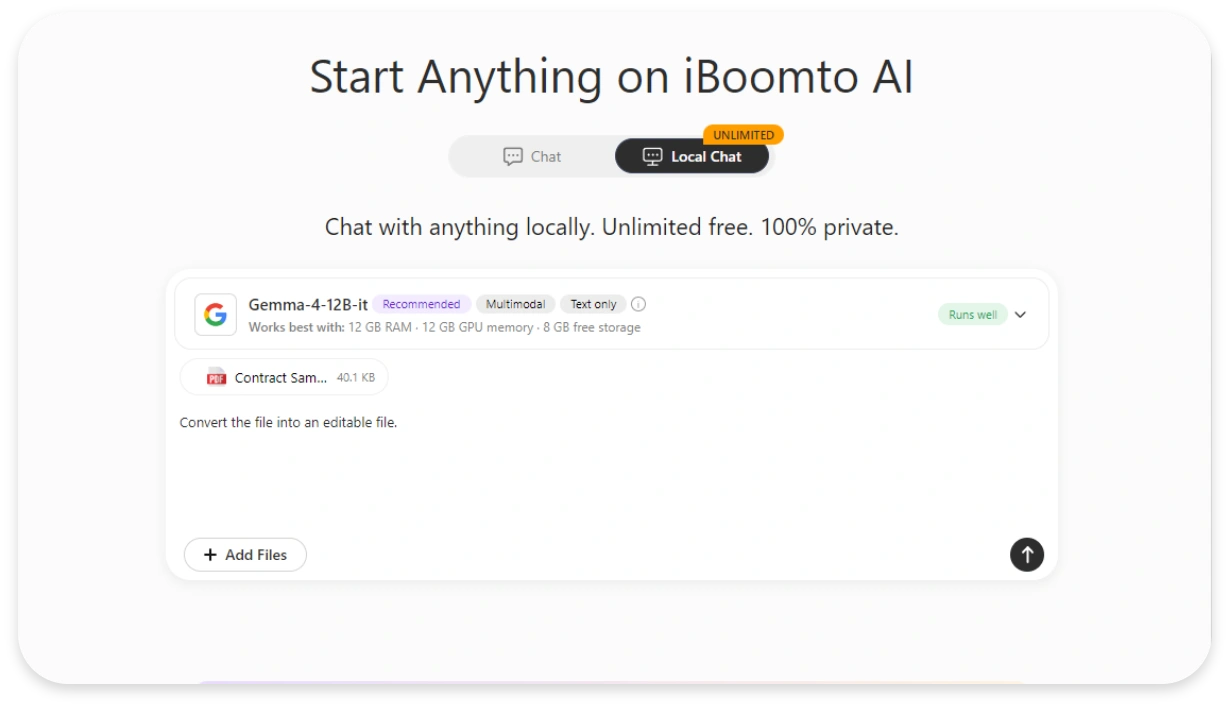
Process Scans with Local AI
Convert the File into an Editable One
Download the Editable Document
FAQs

FAQs About AI Models on iBoomto

Everything to know before you run local LLMs with iBoomto AI.

Still have questions?

Contact Us
How to Choose the Right AI Model as a Beginner?+-
We highly suggest starting with a lightweight model that is compatible with your PC. This category of models generally has under 4B parameters, a file size of 1–4 GB, and can run on a CPU with 8 GB RAM, no GPU needed.
What is the Connection Between iBoomto AI and the Built-in Local Models?+-
iBoomto AI is an intelligent document processing tool that brings multiple local models together and runs them directly on your device. Using the software, you can access a wide selection of local models and handle document workflows from a single interface. There is no need to switch between different platforms.
Do I Need To Download Models Separately for Document Processing?+-
iBoomto AI includes ready-to-use cloud and local models out of the box. No additional installations are required for routine work. If you wish to test alternative models, however, you may download them from the model library at any time.
What Hardware Specs Should I Meet If I Use a PC Without a GPU?+-
Some local-model runtimes support CPU operation, but compatibility and speed depend on the model and its configuration. Multiple local LLMs available in the model library, such as Qwen3 Vision 2B (Instruct/Thinking), Llama3.2 3B, Granite4 Micro 3B, and DeepSeek R1 1.5B, support CPU-only operation with responsive and stable performance.
Minimum PC specifications:
CPU: Modern 4+ core processor
RAM: 8 GB recommended
Storage: Minimum 20 GB free storage
What’s The Difference Between File Download Size And Runtime Memory?+-
Download size is the disk space the model file uses. Runtime memory (RAM/VRAM) is what the model needs while running, usually more than the file size, since it also stores your conversations or documents. A 4 GB model, for instance, may need 5-6 GB of free memory, or more for long documents.
Does Long Context Support Mean Unlimited Document Length?+-
No. Long-context support allows a model to process and reason over more inputs in a single request, but it still has a maximum context limit. Longer contexts consume more memory and may slow down inference, so you can't input unlimited amounts of content at once. For extremely long files, consider splitting the document and processing it in sections.
How Do Local AI Models Differ from the Online Features on iBoomto AI?+-
Local models run locally on your device for a private workflow from start to finish. They function offline at no usage cost, yet the speed and performance are determined by your hardware and model capabilities. Online features operate via cloud. They deliver access to larger, more powerful models without demanding high-spec local hardware. Still, they require internet connectivity and may come with pricing tiers.
Are the Local LLMs Free to Use?+-
Yes. With iBoomto AI, you can install local LLMs on Windows and run them for free.
Do You Get Unlimited Tokens With a Local LLM?+-
There are no token-based charges or monthly volume restrictions, which allows unlimited tasks. Note that local LLMs still have context limits. That limits how much input and output they can handle in a request. Hardware and processing time also constrain practical use. That technical limit is separate from an app's credit or usage policy.
What to Do When My PC Does Not Support Local LLMs?+-
When your device can’t run specific local ones, consider a model with lower requirements, or an available cloud service suited to the task in iBoomto AI.
How Do Local AI Models Handle Long PDFs or Large Context Windows?+-
Local AI models come with varying context window limits. If you load a large file into a model with insufficient context capacity, the system may split the content into chunks for processing or pull only the information most relevant to your prompt. When your hardware is compatible, a larger context window can allow more content in a request, but it does not guarantee a complete or more accurate answer.
Are the Local AI Models in iBoomto AI Regularly Updated?+-
Yes. iBoomto AI continuously updates its local AI model library as new versions and releases become available.
FAQs

FAQs About AI Models on iBoomto

Everything to know before you run local LLMs with iBoomto AI.

How to Choose the Right AI Model as a Beginner?+-
We highly suggest starting with a lightweight model that is compatible with your PC. This category of models generally has under 4B parameters, a file size of 1–4 GB, and can run on a CPU with 8 GB RAM, no GPU needed.
What is the Connection Between iBoomto AI and the Built-in Local Models?+-
iBoomto AI is an intelligent document processing tool that brings multiple local models together and runs them directly on your device. Using the software, you can access a wide selection of local models and handle document workflows from a single interface. There is no need to switch between different platforms.
Do I Need To Download Models Separately for Document Processing?+-
iBoomto AI includes ready-to-use cloud and local models out of the box. No additional installations are required for routine work. If you wish to test alternative models, however, you may download them from the model library at any time.
What Hardware Specs Should I Meet If I Use a PC Without a GPU?+-
Some local-model runtimes support CPU operation, but compatibility and speed depend on the model and its configuration. Multiple local LLMs available in the model library, such as Qwen3 Vision 2B (Instruct/Thinking), Llama3.2 3B, Granite4 Micro 3B, and DeepSeek R1 1.5B, support CPU-only operation with responsive and stable performance.
Minimum PC specifications:
CPU: Modern 4+ core processor
RAM: 8 GB recommended
Storage: Minimum 20 GB free storage
What’s The Difference Between File Download Size And Runtime Memory?+-
Download size is the disk space the model file uses. Runtime memory (RAM/VRAM) is what the model needs while running, usually more than the file size, since it also stores your conversations or documents. A 4 GB model, for instance, may need 5-6 GB of free memory, or more for long documents.
Does Long Context Support Mean Unlimited Document Length?+-
No. Long-context support allows a model to process and reason over more inputs in a single request, but it still has a maximum context limit. Longer contexts consume more memory and may slow down inference, so you can't input unlimited amounts of content at once. For extremely long files, consider splitting the document and processing it in sections.
How Do Local AI Models Differ from the Online Features on iBoomto AI?+-
Local models run locally on your device for a private workflow from start to finish. They function offline at no usage cost, yet the speed and performance are determined by your hardware and model capabilities. Online features operate via cloud. They deliver access to larger, more powerful models without demanding high-spec local hardware. Still, they require internet connectivity and may come with pricing tiers.
Are the Local LLMs Free to Use?+-
Yes. With iBoomto AI, you can install local LLMs on Windows and run them for free.
Do You Get Unlimited Tokens With a Local LLM?+-
There are no token-based charges or monthly volume restrictions, which allows unlimited tasks. Note that local LLMs still have context limits. That limits how much input and output they can handle in a request. Hardware and processing time also constrain practical use. That technical limit is separate from an app's credit or usage policy.
What to Do When My PC Does Not Support Local LLMs?+-
When your device can’t run specific local ones, consider a model with lower requirements, or an available cloud service suited to the task in iBoomto AI.
How Do Local AI Models Handle Long PDFs or Large Context Windows?+-
Local AI models come with varying context window limits. If you load a large file into a model with insufficient context capacity, the system may split the content into chunks for processing or pull only the information most relevant to your prompt. When your hardware is compatible, a larger context window can allow more content in a request, but it does not guarantee a complete or more accurate answer.
Are the Local AI Models in iBoomto AI Regularly Updated?+-
Yes. iBoomto AI continuously updates its local AI model library as new versions and releases become available.

Still have questions?

Contact Us