
How does iBoomto AI billing work?
- How Billing Works
- How to subscribe to the iBoomto AI Pro plan
- Automatic renewal
- What happens if I run out of subscription credits?
- Can I cancel my subscription?
- Where can I view my billing history?
Ready to take your iBoomto AI experience to the next level? This guide will show you how to subscribe to the iBoomto AI Pro plan and understand billing and renewals.
How Billing Works
iBoomto AI Pro offers both monthly and yearly subscription plans designed to give you access to advanced AI features and credits. When you purchase a subscription, you will be charged immediately for the selected billing cycle.
How to subscribe to the iBoomto AI Pro plan
Step 1
Step 2
Step 3
Step 4
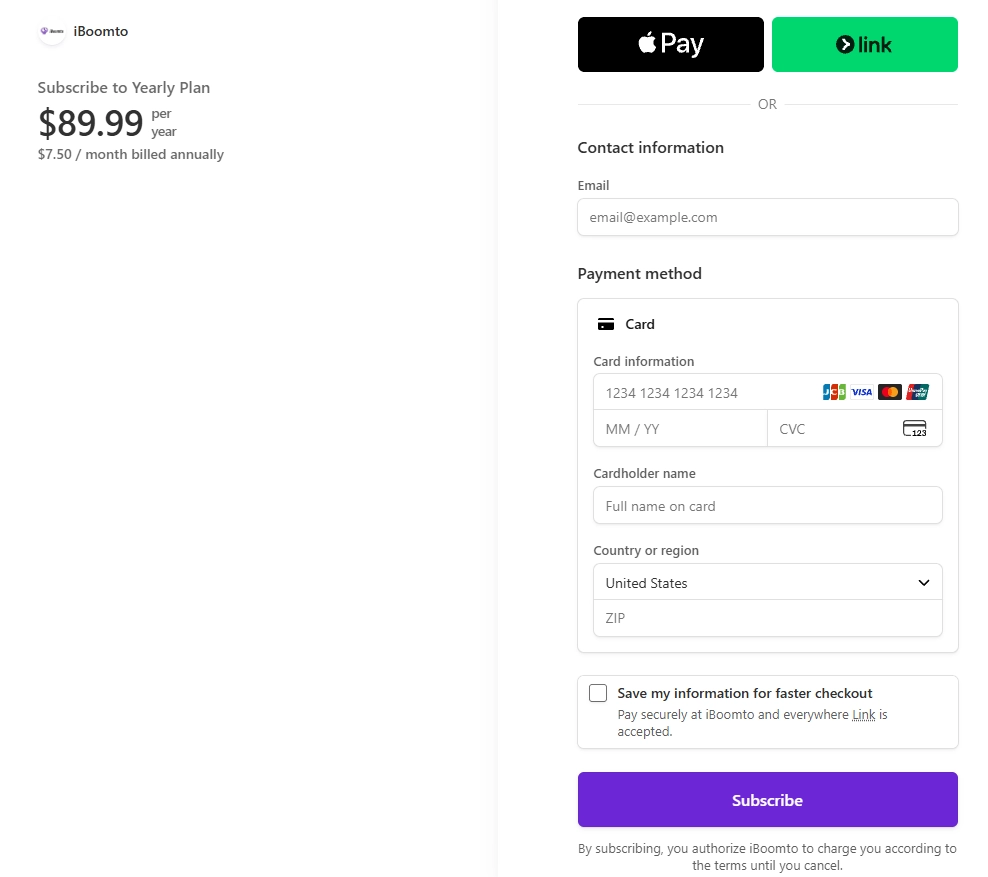
Step 5
Note:
We support most major payment methods — for the fastest checkout, we recommend paying by credit card.
Major Global Credit and Debit Cards: Visa, Mastercard, American Express, Discover, JCB, and China UnionPay
Digital Wallets: Apple Pay, Google Pay, Amazon Pay, Cash App Pay, and Stripe Link
By subscribing, you authorize iBoomto to charge you according to the terms until you cancel.
Your advanced features will be available immediately after activation, and credits will be issued to your account in a lump sum at the beginning of each billing cycle.
Monthly plans include 13,000 Credits valid for the current billing cycle, while yearly plans include 85,000 Credits valid for the full subscription year.
Automatic renewal
For the subscription, iBoomto AI Pro adopts recurring billing. For example, if you purchase an iBoomto AI Pro Monthly Plan on June 2 and do not cancel your subscription before the end of the billing cycle, it will automatically renew on July 2.
We'll send a renewal-reminder email before your subscription renews, to the email address associated with your payment.
What happens if I run out of subscription credits?
If you use up your subscription credits, you can purchase a Credit Pack for additional usage. As long as your subscription remains active, credits from your purchased Credit Pack will not expire.
Can I cancel my subscription?
Yes. You can cancel your subscription at any time by contacting our support team. After cancellation, you will not be charged for the next billing cycle, and your subscription benefits will remain available until your current term ends.
Where can I view my billing history?
You can view your billing history and subscription details from your Account Center.
Was this helpful?
Thank you for your feedback!