Windows Desktop App

Download iBoomto AI for Windows 10/11

Your AI document assistant for Windows. Chat, summarize, and create documents with cloud or local AI models. Build your personal chatbot knowledge base. Free to download, with no coding required.

Download iBoomto AI for Windows
Details

iBoomto AI for Windows: Product Info

ItemDetails
Product NameiBoomto AI
Product TypeWindows Desktop App
Current Versionv1.3
Download Size10.2 MB
Installed SizeAbout 889 MB
Required Disk SpaceAt least 1 GB
Supported OSWindows 10 / 11 (x64) / Windows 11 (ARM64)
Key FeaturesRun local LLMs, connect cloud model APIs, build an AI personal knowledge base, and process and edit documents with AI
Release Date2026/11/03

Main Features Explanation

AI Document Processing and Editing

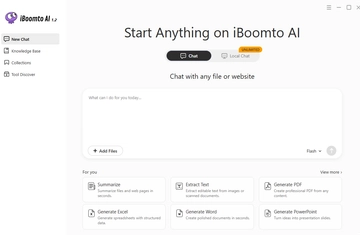
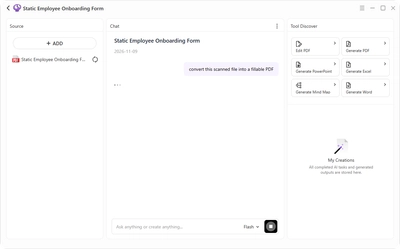
Chat with, summarize, extract, edit, recognize, and generate documents using local LLMs or cloud models, all in one place. Use local models for privacy and cloud models for heavy tasks. Free to start, and no coding required.
AI Knowledge Base

Turn your files, notes, and links into a RAG knowledge base, then ask questions and get answers grounded in your own content. Prebuilt knowledge bases are also available, covering topics from finance and SEO to lifestyle and more.

Step

How to Download and Setup iBoomto AI for Windows 10/11

1Step 1. Download

Click the download button. The installer, iboomto-ai-setup.exe, will be saved to your Downloads folder.

2Step 2. Install

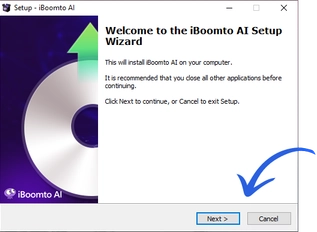
Double-click the installer, then follow the setup wizard to choose an installation location and finish the installation.

Install iBoomto AI for Windows
3Step 3. Open iBoomto AI

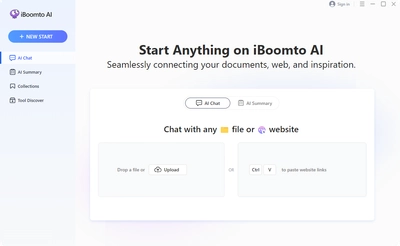
Launch iBoomto AI. No sign-in or account is required.

Run iBoomto AI for Windows
4Step 4. Choose an AI Model

Choose Local Chat or Chat (Cloud API) based on your task and how sensitive your files are.

For sensitive or confidential files: Select New Chat > Local Chat, choose a model labeled "Runs Well", download it, and start chatting. Your data stays on your device.

For general files, large documents, or complex reasoning: Select Cloud Chat. You’d better sign up, because the free trials are limited to 10 messages per day.

Choose a Model on iBoomto AI for Windows

Tip: iBoomto AI automatically checks whether your device can run each local model. Compatible models show Runs Well, and incompatible ones show Not Supported. If your device doesn’t support a local model, you can use Cloud Chat instead.

5Step 5. Start Your Task

Tell iBoomto AI what you want to do with your files. You can ask it to summarize content, extract data, split pages, generate new content, convert file formats, or remove watermarks. You can also upload multiple files to build your own AI knowledge base.

Start a task with iBoomto AI for Windows

Note: To update iBoomto AI to the latest version, click the menu icon (three lines) in the top-right corner of the interface and select Check Updates, or download the latest version from this page.

Local vs Cloud

When to Run Local LLMs on iBoomto AI

iBoomto AI RAG chatbot can work offline, which ensures your data stays on your device. Whether to use local LLMs or a cloud model API depends on your hardware and use case.

Local LLMsCloud API
Definition

Models and data are processed on your device. Best for privacy-focused work, offline use, and low-latency, real-time interaction.

Powerful models and online capabilities are accessed via iBoomto AI. Best for tasks that need more computing power, complex reasoning, and large-text processing.

Hardware Requirements

NVIDIA RTX 2060 or higher
AMD RX 6600 or higher

No special hardware required

Privacy & Security

Your data stays on your device by default.

Necessary data is encrypted in transit and handled according to our Privacy Policy.

Tip: Want to know more about local LLMs and cloud models? See the User Manual.

Safety Checks

Download iBoomto AI Safely: Three Checks Before You Install

Verify the three criteria below to make sure you’re downloading and installing safe, official software on your device:

1Publisher (Digital Signature):

Manually check it in the Windows Graphical Interface.

  1. Right-click the downloaded file and select Properties.
  2. Navigate to the Digital Signatures tab.
  3. Click to highlight the signer's name in the list, then click the Details button.
  4. Look at the verification status: "This digital signature is OK".
  5. Confirm that the company name matches the official publisher (Dual Chart Limited).

2SHA-256 (File Integrity):

234f2cbd55ec05a43aaf77b9e6518cb651df3561e51754815931e68c1093c9f7

3No-Virus Declaration:

Every download is scanned with VirusTotal, and you can check the live scan results here: VirusTotal report.

FAQs

What to Know About Downloading iBoomto AI

Everything you need to know about downloading, installing, updating, and uninstalling iBoomto AI.

Is iBoomto AI safe to download and install?

Yes. iBoomto AI is safe to download when you get the installer directly from this official iBoomto AI website. The Windows installer is digitally signed, so you can verify the publisher before running it. We also publish the SHA-256 value so you can confirm that the file has not been altered.

Do I need an account to use iBoomto AI?

Local chat and offline features do not require an account. Sign in to use Cloud Chat; the free trial allows up to 10 messages per day.

How do I update iBoomto AI?

Open the iBoomto AI desktop app and click the menu icon in the top-right corner > Check Updates. If an update is available, follow the prompts to install it. You can also download the latest version from this official page.

How do I uninstall iBoomto AI?

Go to Settings > Apps > Installed apps (on Windows 10: Apps & features), search for iBoomto in the application list, click Uninstall, and follow the prompts to delete the downloaded models and your data.

Why does Windows SmartScreen block the installer?

Windows may show a SmartScreen warning for newly released or less commonly downloaded installers. Only download iBoomto AI from this official page, and verify the publisher and SHA-256 value before installing.

Still have questions?Contact Us